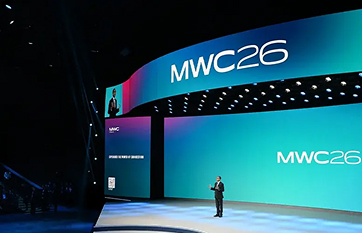
MWC Barcelona Fira Gran Via 2026
MWC Barcelona Fira Gran Via 2026 will take place from March 2 to 5, 2026
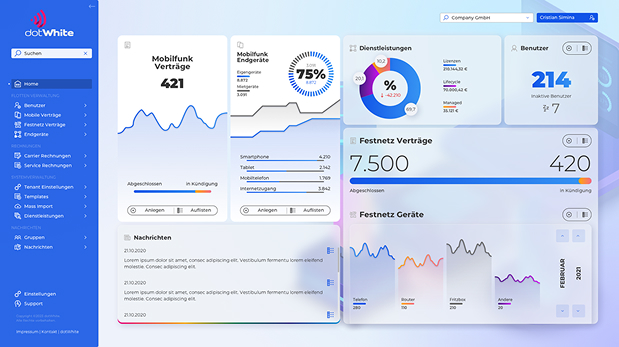
We created a telecommunications information system that aggregates and connects data on employees, telephone numbers, invoicing agents, devices, and contracts, using direct, vendor-specific interfaces.
This web application is designed to be a management portal, Back-Office as well as Front-Office, for Mobility Devices, Phones, Tablets, Laptops, and their related entities.
Its focus is the management of the device lifecycles, their users and contracts. Additionally, the functionality also extends to reports, support activity and ordering processes, to name a few.
For ease of use, the clients can customize several parts of the application to their liking. Both the Frontend and the Backend were developed to be used as a White Label product.
Data is gathered not only by direct CRUD operations but also from semiautomated import processes, periodic B2B data retrievals and direct communication with third party services, all in a managed and secure way.
The Backend uses a Microservices architecture and is composed of several services, working behind a gateway, while the Frontend is a single page application using ReactJS, Redux and DevExtreme components.
The entire system is hosted in Microsoft Azure, in both dedicated CentOS Linux Virtual Machines as well as Azure Service Apps.
Over 200 screens were custom designed by dotWhite using Sketch and Figma. Consistency was achieved using a Design System.
Methodology: Agile (Scrum/Kanban), supported by Azure DevOps and the Atlassian Products Suite (Jira, Confluence, Bitbucket, Bamboo)
Languages: C#, JavaScript, HTML, CSS, T-SQL
Stack: .NET (Core) versions 5 through 7, ASP.NET Web API, SignalR, ReactJS, Redux, Entity Framework Core, OData, DevExtreme, NPOI, Ocelot
CI/CD: Bamboo, later through Azure Pipelines (with Docker)
Design: Sketch, Figma and Icons8
The application is handling data from hundreds of tenants, close to 1000 tenants, each with its own separate database. This is realized with a custom implementation of the database context.
The application allows several export formats (csv, excel, pdf) of business-related reports, as well as custom and WYSIWYG type export of data from data grids in the Frontend. Besides the instant reports, on demand reports with cross tenant data is also implemented.
The application is set up to communicate with third party API (both ways) to handle data it is not directly responsible, but which are needed in some reports and charts.
Besides the normal flow of users, the application also needed a way to let certain users view a limited amount of information for a given period. Think about it as a ‘quick view’ that is sent out in an email and can be accessed without log in, if you have the link.
Like most management portals, an automated audit trail was implemented where all changes can be tracked in case the information is needed for an audit. On top of this technical audit trail, a history was also added which contained changes relevant to the business in a domain relevant way (so not everything was tracked, and not only direct changes but also related and side information were also tracked)
Backend job that runs automatically based on a schedule in order to keep the database in sync. It connects to third party endpoints, retrieves data for a specific tenant connection list and decides whether to insert or update data. It logs the synchronization result individually for each tenant connection and sends an email after each synchronization with summary information.
For certain entities, custom fields can be defined. All the other features (import, export) apply to these new fields as well. The custom fields may have localized labels, may be defined as required, validation being assured by both Frontend and Backend.
Notification system that announced to the users whenever new articles were posted. Admins may create news articles in a separate management page, where HTML editors are used.
Using Excel import files, SQL imports and custom import tools written by us for special cases, we were able to migrate in a quick manner all data from clients of the legacy portal.
On the Frontend, related entities contained a link to the relevant information. For example: if a device within a grid had an owner, the name of the owner was a hyperlink to the page to that user’s information page.
Users of the application had the possibility to attach notes to certain assets. These notes were visible in a fly-over panel and could contain text information as well as file attachments. Existing notes, including attachments, were also imported from the legacy system (and updated to the new format).
Automatic import system that can differentiate between insert and update and may also perform other operations such as delete or hard reset. For this feature we used NPOI library to read data from the Excel files, then we solved the technical problems of mapping, validating and operation process ourselves on the backend. For the continuous UI updates during the process, we used SignalR.
As our assets had various fields that were not required to be always seen within the DevExtreme Grid functionality, we implemented a feature that keeps track of each user’s layout. By this, each user could determine what information is to be displayed depending on their area of interest and persist this layout between logins. Moreover, you could create several column layouts and change them with just a click. You could even share these layouts between all the users within a tenant or mark them as private.
To ensure an immediate and transparent start to our partnership, we provide our proprietary project management suite fully hosted and configured at no additional cost.
This strategic investment eliminates operational barriers, allowing our teams to align instantly and focus entirely on the sophisticated execution of your project goals.

Atlassian Crowd - To provide seamless Atlassian products integration and SSO capabilities.

Atlassian Jira - Our ticketing system. As a client, you can see the tickets in real time, or you can create tickets if needed. Also, here you will receive updates from our colleagues on each ticket separately.

Atlassian Confluence - Wiki system and documentation database. Clients will have access to documentation and useful information about the project.

Atlassian Bitbucket - The code repository is where all the source code is available at any time.

Atlassian Bamboo - This tool is handling the Continuous Integration, Automatic Testing and Quality Assurance for the project.

Sketch - Design ecosystem for sketches and mockups.

Figma - Design ecosystem for sketches and mockups.
MWC Barcelona Fira Gran Via 2026 will take place from March 2 to 5, 2026

IFA International Consumer Electronics Show will open its doors again in September 2026.
Ready to make an impact? Let's meet. Schedule a meeting and discover how we can build something great together.